
Google Ads negative keywords stop ads from serving on searches that do not fit the offer. The hard part is reviewing thousands of queries without missing waste or blocking real demand. An AI-assisted workflow can score and group the search terms, but a human operator should approve every exclusion and choose the right match type and scope.
What are Google Ads negative keywords?
Google Ads negative keywords are exclusion terms. They tell the platform not to show an ad when a search matches the negative according to its match type. Used well, they keep irrelevant clicks away from the campaign. Used badly, they remove useful demand before it can convert.
Google’s negative keyword documentation supports negative broad, phrase, and exact match for Search campaigns. These negative match types behave differently from positive keywords. Google also notes that advertisers may need to add synonyms and singular or plural versions because negative keywords do not match every close variant automatically.
That makes negative-keyword work a classification problem, not a bulk-delete task. The operator must answer four questions for each search term:
- Is the query about the product or service?
- Is the searcher a plausible buyer?
- Does the query show acquisition intent?
- What does conversion and CRM data say about similar searches?
If any answer is unclear, the term belongs in a review queue, not an automatic exclusion list.
The case: 4,500 search terms reduced to 300 reviews
After reviewing more than 100 Google Ads accounts, I kept seeing the same pattern: thousands of low-volume search terms received too little attention, while obvious irrelevant clicks accumulated into meaningful monthly waste. In many accounts, the visible waste was roughly $5K to $10K per month.
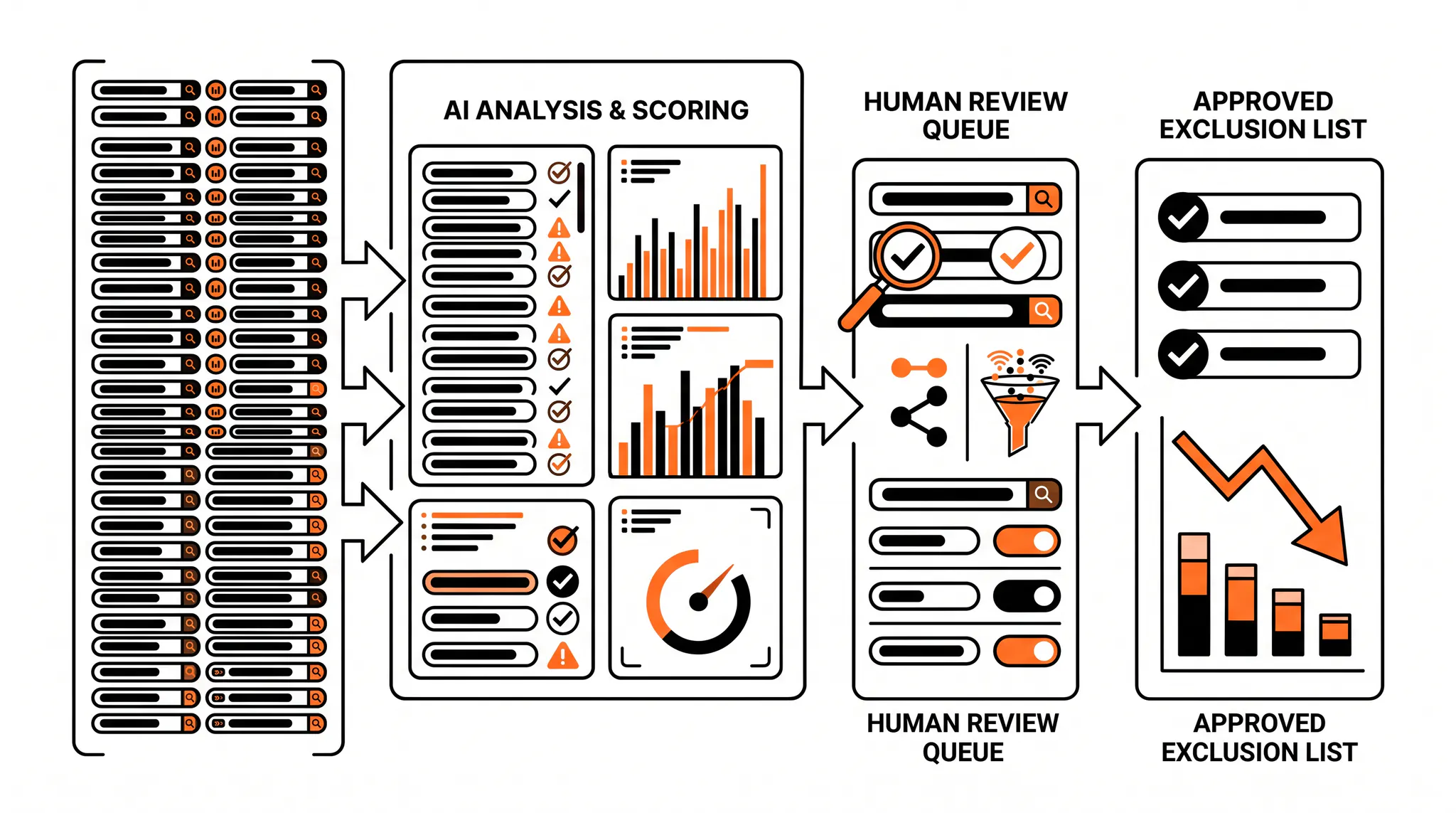
On one B2B software account, our workflow pulled 4,500 search terms. Instead of asking an operator to read every row with equal attention, the system scored each term from zero to ten for relevance, explained the score, and flagged about 300 for close review. The human review produced 700 approved negative keywords, including queries such as “recreational bowling” that had no connection to the software buyer.
After the cleanup, the account measured a 20% CAC reduction within a few days. That is one account result, not a guarantee. The useful lesson is the process: AI narrowed the work, but the operator made the exclusion decisions.
| Workflow stage | Volume | Human role |
|---|---|---|
| Raw search terms | 4,500 | Define business, buyer, and conversion context |
| Priority review queue | ~300 | Review uncertain or high-spend terms closely |
| Approved negatives | 700 | Confirm match type, scope, and risk |
| Post-change monitoring | Ongoing | Watch qualified conversion volume and blocked demand |
This process extends our Google Ads audit with a scalable review method and a human approval gate. It is one of the five Claude skills we use for Google Ads, alongside account auditing, starter negatives, conversion retraction, and funnel diagnosis. It is also part of the broader Google Ads AI agent workflow we use for pacing, search-term triage, and report drafting.
Why manual search-term review breaks at scale
Manual review fails when every row receives the same amount of attention. A term with one impression and no spend sits next to a term that has consumed thousands of dollars. Clear junk, uncertain intent, and proven converters all compete for the same review time.
The search terms report is still the source. Google says it shows the actual searches that triggered ads and can be used to find negative-keyword ideas. Its search terms guidance recommends adding searches that are not relevant to the product or service as negatives.
A useful system should prioritize terms by:
- Spend and click volume
- Conversion and qualified conversion history
- Product and buyer relevance
- Match type and triggering keyword
- Campaign, ad group, geography, and landing page
- Confidence that the query is truly wrong
AI is good at the repetitive classification. A person is better at deciding whether an ambiguous term represents a new market, a weak match, or a dangerous exclusion.
The AI-assisted negative keyword workflow
A reliable workflow has five stages: ingest, enrich, score, review, and monitor. The sequence matters because a model cannot classify account context it never received.
1. Ingest the full search terms report
Pull the search terms, not only the keyword list. A keyword is what the advertiser targeted. A search term is what the user typed. The report should include campaign, ad group, triggering keyword, match type, clicks, spend, conversions, conversion value, and the date range.
Use enough history to cover the sales cycle. A seven-day export may label a valuable B2B query as unproductive when its pipeline has not matured. For longer sales cycles, join the query data with CRM stages or offline conversions before scoring it.
2. Add business and buyer context
The model needs a clear description of what the company sells, who can buy, excluded segments, supported geographies, minimum requirements, and the difference between acquisition and support intent.
For a B2B platform, “login,” “jobs,” “certification,” and “free template” may be obvious negatives. For another advertiser, those terms may be products, lead magnets, or important brand-defense queries. Generic negative lists are dangerous because relevance depends on the business.
3. Score each query with evidence
Use a simple score and a written reason. The number prioritizes review. The explanation lets the operator challenge the model.
| Score | Classification | Recommended action |
|---|---|---|
| 0-2 | Clearly irrelevant | Review for broad or phrase negative |
| 3-4 | Likely wrong buyer or intent | Review context and triggering keyword |
| 5-6 | Ambiguous | Keep active and collect more evidence |
| 7-8 | Relevant but unproven | Monitor spend and downstream quality |
| 9-10 | Strong fit or proven converter | Keep, and consider tighter campaign structure |
A strong prompt asks for product fit, buyer fit, funnel stage, and evidence from the row. It should also force the model to say “uncertain” when the account context does not support a confident decision.
4. Require human approval
The workflow should never write directly to Google Ads. The output is a proposed list with query, score, reason, match type, scope, and supporting metrics. An operator approves, changes, or rejects each item.
This guardrail prevents the most expensive error: blocking a relevant theme across too much of the account. It also creates an audit trail. When qualified volume drops, the team can see exactly which exclusions were added and why.
5. Monitor after the negatives go live
Negative keywords change eligibility immediately, but business outcomes may take a full conversion cycle to appear. Track spend, qualified conversions, search volume, impression share, and downstream CAC after the change.
If spend falls and qualified conversion volume holds, the cleanup removed waste. If qualified volume falls faster than spend, inspect the new negatives for overreach. A before-and-after table by campaign is more useful than one blended account metric.
Choose the right negative match type
Google says negative broad, phrase, and exact match each block different query patterns. Choosing the wrong type can make a correct idea too aggressive or too narrow.
| Negative match type | Blocks when | Best use | Main risk |
|---|---|---|---|
| Broad | The query contains all negative terms, in any order | Themes that are always irrelevant | Can block more combinations than expected |
| Phrase | The query contains the exact phrase in order | Repeated wrong-intent phrases | Misses reordered variations |
| Exact | The query is the exact term without extra words | One proven bad query | Requires many entries to cover a theme |
Google notes that negatives added directly from the search terms report are negative exact match by default. Its guide to getting negative-keyword ideas from search terms recommends checking the selected match type before saving.
Start narrow when the term could be valid in another context. Move broader only when the entire theme is clearly wrong.
Decide where the negative keyword belongs
Scope determines how much traffic the negative can block. Use the smallest scope that solves the problem.
- Ad group: the term is wrong for one theme but valid elsewhere in the campaign.
- Campaign: the term is wrong for that campaign’s product, geography, or intent.
- Shared list: the term is wrong across a known group of campaigns.
- Account level: the term is wrong across all relevant Search and Shopping inventory.
Google’s account-level negative keyword documentation says one account-level list can apply across relevant Search, Performance Max, App, Shopping, Smart, and Local inventory. Account-level negatives should be boring and obvious. A product name, competitor, use case, or industry term usually deserves a narrower decision because it may be valuable somewhere else.
Common negative keyword mistakes
The first mistake is approving the model’s entire list. AI can misunderstand jargon, product names, competitor terms, or emerging use cases. Its confidence score is not evidence that the exclusion is safe.
The second mistake is reacting to one expensive click. Relevant B2B queries often have high CPCs and delayed conversion. Use enough spend, time, and downstream data to separate a costly query from an irrelevant query.
The third mistake is using broad negatives for ambiguous themes. A broad exclusion can erase profitable long-tail combinations. Start with exact or phrase match when the risk is not clear.
The fourth mistake is ignoring positive keyword strategy. Negative keywords are essential when broad match expands volume, but endless exclusions cannot rescue weak targeting, a bad offer, or the wrong conversion signal. After cleaning the query pool, use the expected CTR improvement guide to align ads with the remaining intent. Use the Google Ads campaign settings audit to confirm the networks and goals before blaming the query list.
The fifth mistake is never revisiting the list. Review shared and account-level negatives quarterly, especially after a product launch or geographic expansion.
How to run this workflow yourself
- Export 60 to 90 days of search-term data.
- Add qualified conversions or CRM stages where available.
- Document the product, buyer, excluded segments, and valid edge cases.
- Score every query for product fit, buyer fit, intent, and evidence.
- Route low-confidence and high-spend terms to the top of the review queue.
- Approve each negative manually.
- Select exact, phrase, or broad match deliberately.
- Apply the smallest safe scope.
- Record the change and reviewer.
- Monitor spend and qualified outcomes through the conversion cycle.
The takeaway
Google Ads negative keywords are one of the fastest ways to remove irrelevant search spend, but speed without review creates a second problem. Use AI to read and prioritize the search terms report, not to make unapproved account changes. Give the model business context, require reasons, review match type and scope, then judge the result on qualified customers and CAC.
TNT Growth runs senior-led Google Ads management for brands spending $75k+/mo, with search-term review tied to downstream conversion data. Review our Google Ads and tracking services, see results tied to revenue, or book a call for an account review.
Frequently asked questions
What are negative keywords in Google Ads?
Negative keywords are terms that prevent ads from showing for searches that do not fit the offer. In Search campaigns, advertisers can use negative broad, phrase, or exact match. The match behavior differs from positive keywords, so exclusions should be reviewed carefully before they are applied across campaigns or at the account level.
How do you find negative keywords in Google Ads?
Start with the Google Ads search terms report, then classify each query by product fit, buyer fit, intent, and conversion evidence. Clear mismatches can become negatives. Relevant or ambiguous terms should remain under review until there is enough downstream data. AI can score and group the terms, but a human should approve the final list.
Can AI choose Google Ads negative keywords?
AI can speed up classification, explain why a query may be irrelevant, and surface patterns across thousands of rows. It should not publish exclusions without review. A wrong negative can block profitable demand across an ad group, campaign, list, or account. Use AI for prioritization and evidence gathering, then require an operator to approve every write.
How often should you review the search terms report?
Review frequency should rise with spend and query volume. TNT Growth reviews high-spend accounts two to three times per week, while smaller stable accounts may need weekly or biweekly review. The right cadence catches new waste quickly without reacting to one click or blocking a relevant query before it has enough data.
Should negative keywords be added at the account or campaign level?
Use account-level negatives only for terms that are wrong across the entire business, such as jobs, login, support, or an excluded market when those never represent acquisition intent. Use campaign or ad-group negatives when the term is valid elsewhere. The broader the scope, the greater the risk of blocking useful demand.