
Google Ads assets are the extra links, details, images, and actions that can appear around a Search ad. They can make the ad more useful and take up more space, but only when each asset matches the offer and buyer intent. Audit these 11 types monthly so stale links, weak claims, and wrong actions do not waste the added visibility.
What Google Ads assets do
Google Ads assets add useful information or a direct action to the core ad. A searcher might see extra page links, a phone button, a location, an image, pricing, or a promotion. Google says assets are free to add and can show when the system predicts they will improve performance.
Assets used to be called ad extensions. The name changed, but the operating question did not: does this extra element help the right person make the right next move?
More assets do not automatically mean better business results. An account can earn a higher click-through rate while sending people to an outdated offer, the wrong location, or a general page that does not match the query. Judge assets by qualified conversion cost and revenue, not only clicks.
Google recommends using every asset type that is relevant to the business and considering at least four asset types. Its official asset overview also explains that assets may be created at the account, campaign, or ad group level. The level matters because a broad account-level asset can appear with campaigns where it makes little sense.
Google Ads assets checklist: 11 types
The current checklist below covers the asset types most Search advertisers should review. Not every business needs all 11. The point is to make a deliberate decision instead of leaving the Assets tab untouched.
| Asset type | Best use | Main failure mode |
|---|---|---|
| Sitelink | Send buyers to specific high-intent pages | Broken, generic, or low-intent destination |
| Callout | State short proof, terms, or benefits | Repeats headlines or makes vague claims |
| Structured snippet | List defined products, services, or types | Wrong header or duplicated items |
| Image | Add relevant visual context | Generic stock image or wrong offer |
| Business name | Make the advertiser clear | Name does not match verification |
| Business logo | Reinforce recognition and trust | Blurry, cropped, or outdated logo |
| Call | Let qualified prospects phone directly | Unstaffed line or weak call tracking |
| Location | Help local buyers visit or call | Wrong address, hours, or routing |
| Price | Set expectations before the click | Stale or misleading price |
| Promotion | Surface a real limited-time offer | Expired terms or missing landing-page match |
| App | Send mobile users to the app store | Used when the website is the real destination |
1. Sitelink assets
Sitelinks send people to specific pages beyond the main landing page. Google recommends at least four active sitelinks, and its current guidance allows up to 20 at the account, campaign, or ad group level.
Use sitelinks for choices that already exist in the searcher’s decision, such as services, pricing, case studies, locations, or a contact page. Do not fill the set with low-intent blog links merely to reach the recommended count.
Audit every final URL. A sitelink that redirects, returns an error, or points to an old offer adds friction before the prospect reaches the page.
2. Callout assets
Callouts are short, non-clickable phrases that add details around the ad. Good callouts state a real buying criterion or proof point, such as service coverage, response terms, certification, or a specific operating feature.
Weak callouts repeat the headline or use claims any competitor could make. “Great service” tells the buyer nothing. “Salesforce conversion tracking” names a real capability.
Google recommends at least four callouts. Keep them short enough to combine cleanly because the system may serve several together.
3. Structured snippet assets
Structured snippets pair a predefined header with a list. They work when the business has a clear set of service types, brands, models, courses, destinations, or amenities.
Choose the header first, then write values that actually fit it. Do not force benefit statements into a categorical list. A B2B agency might use “Service catalog” with Google Ads, conversion tracking, landing pages, and analytics rather than restating its sales pitch.
4. Image assets
Image assets give Search ads visual context. Google recommends at least three unique and relevant images for stronger coverage. The image should reinforce the product, result, person, or environment behind the query.
Avoid generic stock photos that could represent any company. Check that crops work at different ratios and that important text is not baked into an area likely to be cut off. Google’s current asset specifications list 1200 by 628 and 1200 by 1200 as common image sizes across products.
5. Business name assets
A business name asset tells the searcher who is running the ad. It must match the verified business or domain rather than a promotional phrase.
This sounds basic, but it matters when the account contains several brands, locations, or white-label campaigns. Check that the name attached at the account or campaign level is correct for every ad group below it.
6. Business logo assets
A logo helps a searcher identify the advertiser quickly. Google reports that advertisers showing a business name and logo with Search ads see an average of 8% more conversions at a similar cost per conversion. That is Google’s aggregate result, not a forecast for an individual account.
Use a current, high-resolution logo that matches advertiser verification. Review square and horizontal versions for blur, unwanted white space, and poor contrast.
7. Call assets
Call assets add a phone number or call button. They fit businesses where a phone conversation is a real conversion path and someone can answer at the scheduled time.
Do not add a call asset just because calls sound valuable. Confirm operating hours, routing, recording disclosures, unique caller identification, and the definition of a qualified call. Our Google Ads call tracking guide explains why raw call volume can train bidding toward repeat customers or low-value callers.
8. Location assets
Location assets can show an address, distance, map details, or store information. Use them when a person can visit a real location or when local presence materially affects the choice.
Check the linked business profile, address, hours, phone routing, and location ownership. Multi-location advertisers should make sure a campaign does not inherit an irrelevant location from a broad account-level setup.
9. Price assets
Price assets let buyers compare defined offers before they click. They work best when products or service packages have stable, clear prices and matching destination pages.
Do not use a teaser price that disappears on the landing page. If the final cost depends on scope, state the unit or starting condition clearly. The purpose is to qualify interest, not create a surprise after the click.
10. Promotion assets
Promotion assets highlight a real sale or limited-time offer. They can include the occasion, discount, promo code, and dates.
Schedule them in advance and set an owner for removal. An expired promotion creates distrust and may also send paid traffic to a page where the offer no longer exists. Confirm the discount and terms match the landing page word for word.
11. App assets
App assets link mobile users to an app store. Use them when installing the app is the intended next step. They are not a substitute for a standard web destination when the buyer needs pricing, qualification, or a sales conversation first.
Google detects the user’s operating system and can route to the relevant store. Check that attribution distinguishes an install from an activated or paying user.
How to audit Google Ads assets each month
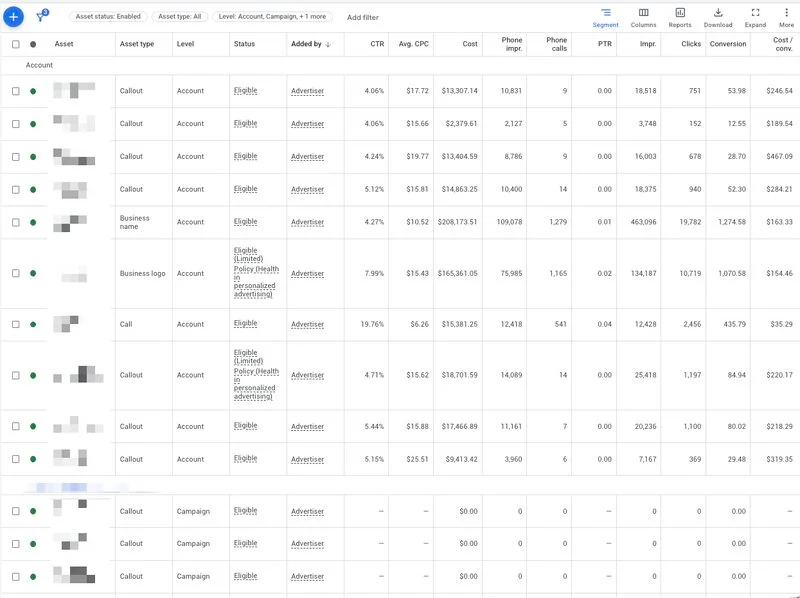
A monthly review should answer three questions: is the asset eligible, is it accurate, and does it help qualified buyers?
- Open Campaigns, then Assets.
- Segment by asset type, level, and status.
- Find disapproved, limited, or inactive assets.
- Click every sitelink, price, promotion, and app destination.
- Check business information, logos, locations, phone numbers, and operating hours.
- Compare clicks and conversions with qualified outcomes in the CRM.
- Remove or narrow assets that appear under the wrong campaign.
- Refresh stale offers, proof, images, and seasonal language.
- Review automated assets separately so Google-created elements do not send traffic to weak pages.
- Record the change, owner, expected result, and review date.
This asset review belongs inside a broader Google Ads management checklist. Search terms, conversion tracking, landing pages, and bidding still matter more than polishing an extra line of ad copy while the account chases weak leads.
Common Google Ads asset mistakes
The first mistake is treating completeness as the goal. Google can reward a fuller setup in the interface, but the business still needs each element to qualify and convert the right buyer.
The second is setting everything at the account level. Account-level coverage is efficient until one campaign needs a different phone number, location, offer, or page. Use the narrowest level that preserves relevance without creating maintenance work nobody will own.
The third is ignoring automated assets. Google can create dynamic sitelinks, callouts, structured snippets, business information, images, and promotions. Review the account-level automated asset controls and check what actually served.
The fourth is reading asset metrics without the CRM. A sitelink can win clicks and still attract support requests instead of prospects. Use the same downstream standards applied in the 50-point Google Ads audit checklist.
When not to add an asset
Do not add an asset when the action cannot be supported. Skip call assets when nobody answers. Skip location assets for a remote service with no visitor location. Skip price assets when the number will mislead. Skip promotions when the landing page cannot honor the terms. Skip app assets when the sales path belongs on the website.
An asset should remove uncertainty or shorten the path. If it adds another route to a weak page, an untracked phone line, or an irrelevant action, leave it out until the experience is ready.
The takeaway
Google Ads assets can add visibility, context, and useful actions without a separate media fee. That makes them worth a monthly audit, but not blind adoption. Start with relevant sitelinks, callouts, structured snippets, business information, and images. Add calls, locations, prices, promotions, and app links only when they fit the buyer’s next step.
If the account has strong ads but weak qualified pipeline, the issue may sit deeper than the asset set. Review TNT Growth’s Google Ads and conversion tracking services, see results tied to revenue, or book a free 30-minute ad audit.
Frequently asked questions
What are Google Ads assets?
Google Ads assets are extra pieces of information or creative that can appear with an ad, including sitelinks, callouts, images, a business name, a logo, phone details, locations, prices, promotions, and app links. Google chooses eligible combinations based on the query, device, campaign, and predicted performance.
Which Google Ads assets should every advertiser use?
Most Search advertisers should start with at least four relevant sitelinks, four callouts, structured snippets, verified business information, and useful images. Add call, location, price, promotion, or app assets only when they match the buyer's next step and the business can support the action.
How often should Google Ads assets be reviewed?
Review Google Ads assets monthly and after any pricing, offer, brand, phone, location, or landing-page change. High-spend accounts should also check asset disapprovals, broken URLs, and call routing during weekly quality assurance.
Do Google Ads assets always show?
No. Assets are eligible to show when Google predicts they will improve the ad's performance and when the auction, device, placement, policy status, and Ad Rank support them. Adding an asset does not guarantee an impression.
Are Google Ads extensions and assets the same thing?
Yes, in most current usage. Google renamed ad extensions as assets. Older documentation, account labels, and search queries may still use extensions, but the practical job is the same: add useful information or actions around the core ad.