
Google lets you send negative conversions, and hardly anyone uses them. A negative conversion retracts a bad lead: you upload it back to Google with a retract instruction, and the algorithm stops finding people like that lead. It is one of the fastest ways to raise lead quality without changing a single campaign, ad, or keyword.
Why bad conversions quietly wreck performance
Every form fill and booked call gets sent back to Google as a positive signal. Google then goes and finds more people like whoever converted. That is the whole game with Smart Bidding: you tell it what a good outcome looks like, and it hunts for more of them.
The problem is that a large share of those conversions are not good outcomes. Across the accounts we manage, it is common for 20 to 30 percent of leads to be spam, auto-disqualified, duplicates, or plain ICP mismatches. If you keep reporting those as wins, you are teaching the model to find more junk. You end up paying to acquire the exact leads your sales team throws away.
Most advertisers never close this loop. They obsess over keywords, bids, and ad copy while feeding the algorithm a polluted definition of success. Negative conversions fix the definition.
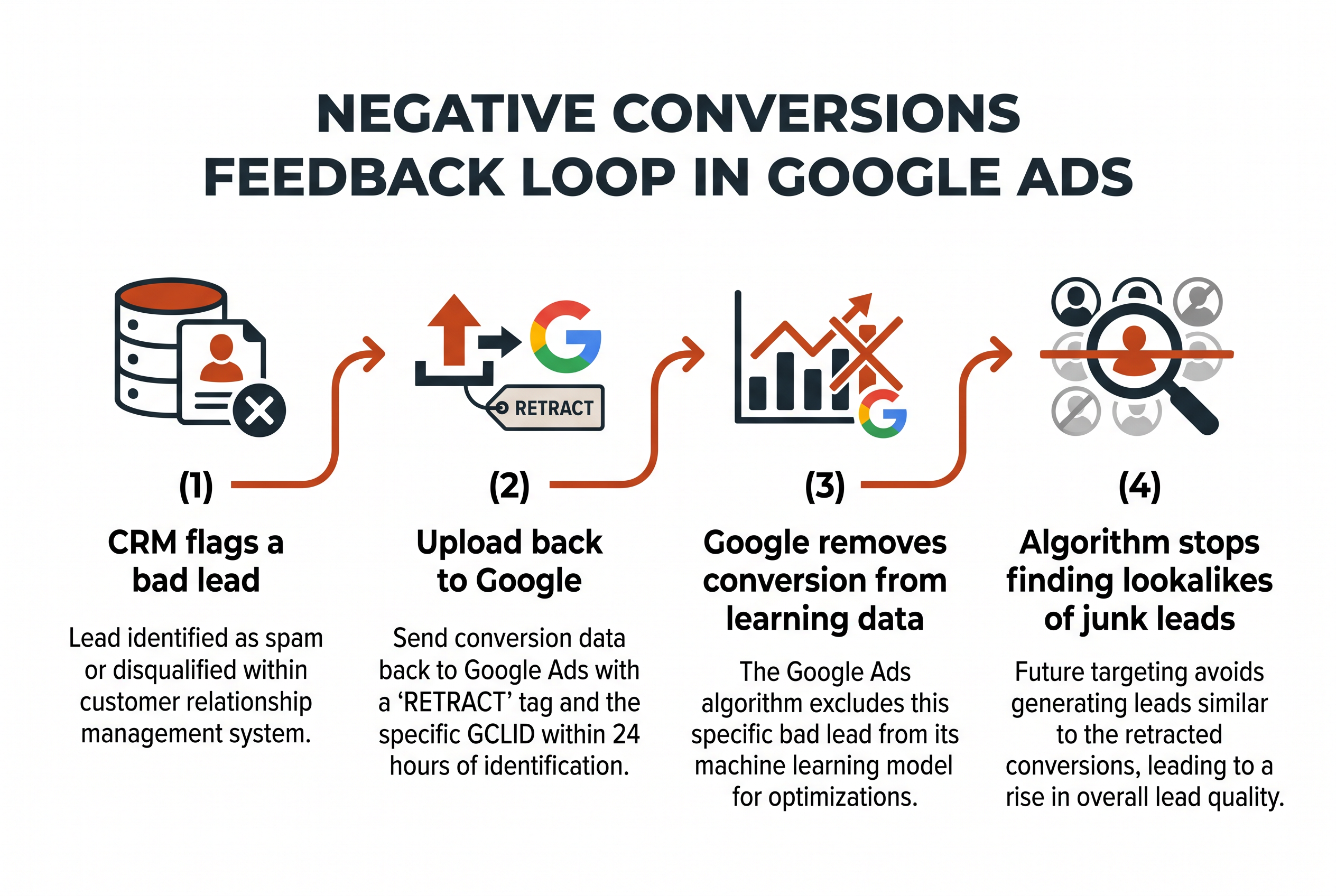
The 4-step negative conversion flow
Here is the exact process we run on accounts spending millions per month.
1. Set up offline conversion import first
This only works if you are already passing conversion data back to Google. That means the GCLID (Google Click ID) is captured when someone clicks your ad and stored against their record in your CRM. If you are not doing offline conversion import yet, that is the prerequisite. It is the same plumbing that lets you optimize toward qualified leads and revenue instead of raw form fills.
2. Create an import with a retract instruction
Build a separate offline conversion upload that carries a retract column. When a sales rep marks a lead as spam, disqualified, a duplicate, or a test submission in your CRM, that record gets flagged for retraction. You upload it back to Google with the retract tag and the original GCLID. Google reads that as, “this conversion was bad, remove it from your learning data.”
3. Do it within 24 hours
Speed is the whole point. The faster you retract, the less time Google spends optimizing toward that bad signal. We automate this straight from the CRM so retractions fire the same day a lead gets disqualified. A weekly manual upload works, but it lets the algorithm chase lookalikes for days before you correct it.
4. Watch the downstream effect
Once the retractions are flowing, the algorithm stops building lookalikes of your junk leads. Lead quality climbs without any change to campaigns, ads, or keywords. You are not turning anything off. You are correcting the feedback the system learns from.
Why this matters most for Performance Max
Negative conversions help every campaign type, but Performance Max is where they earn their keep. PMax pulls from Search, Display, YouTube, Discover, and Gmail, so it has an enormous audience pool to wander into. Feed it a sloppy conversion signal and it will confidently expand into placements that look like your worst leads.
We see this constantly on PMax takeovers: the campaign generates plenty of volume, but the quality is off because “book a call” or “form submit” is a weak signal that anyone can trip. Retracting bad conversions tightens what PMax chases. If your PMax is producing quantity but the leads feel wrong, this is one of the first fixes to reach for, alongside moving to a deeper conversion event. We walk through that full diagnosis in our guide to fixing PMax spam leads.
How negative conversions fit the bigger picture
Retraction is one half of a two-sided conversion strategy. The other half is pushing your primary conversion as deep into the funnel as your volume allows, so Google optimizes toward buyers instead of clickers. Taken further, that means stacking multiple conversion actions like MQL, SQL, and customer, and weighting the deep ones heavier. Conversion retraction is also one of the five Claude skills we use for Google Ads, alongside auditing, search-term scoring, starter negatives, and funnel diagnosis. That combination, deep down-funnel signal plus fast retraction of bad leads, is the core of how we scaled an account 4.6x while holding CPA under target.
It also pairs with filtering demand at the front door. Negative conversions clean up the signal after the click, while disqualification ads filter unqualified clicks before you ever pay for them. Run both and the algorithm gets a much sharper picture of who you actually want.
For the technical steps Google expects, its own documentation on uploading offline conversions and adjusting or retracting them is the authoritative reference. Match your column formatting to what it specifies or the upload will silently fail.
The takeaway
Negative conversions are a free lever most accounts leave untouched. Set up offline conversion import, flag disqualified leads in your CRM, upload retractions within 24 hours, and let the algorithm stop chasing lookalikes of your junk. Lead quality improves without touching a keyword.
If you want a team that runs this loop for you across millions in monthly spend, TNT Growth manages full-stack Google Ads for brands spending $50k+/mo. Book a call and we will show you where your conversion signal is leaking.
Frequently asked questions
What is a negative conversion in Google Ads?
A negative conversion is a retraction. You upload a previously reported conversion back to Google with a retract instruction and its GCLID, telling the algorithm that lead was actually bad. Google removes it from the learning data so it stops optimizing toward people like that lead.
How do you send negative conversions to Google?
You need offline conversion import running first, which means GCLIDs flow from your ads into your CRM. When a rep marks a lead as spam, disqualified, or a duplicate, you upload that record back to Google Ads with the retract instruction. Google processes the retraction and drops the conversion from its model, usually within 24 to 48 hours.
How fast should you retract a bad lead?
Within 24 hours. The longer a bad conversion sits in Google's learning data, the more the algorithm optimizes toward lookalikes of that junk lead. Automating the retraction from your CRM so it fires the same day the lead is disqualified gives you the cleanest signal.
Do negative conversions help Performance Max campaigns?
Yes, and PMax is where they matter most. PMax pulls from Search, Display, YouTube, Discover, and Gmail, so it will happily expand into audiences that resemble your worst leads. Retracting bad conversions is one of the few levers you have to steer PMax back toward qualified demand.