
Google Ads offline conversion tracking connects ad clicks to CRM outcomes such as qualified proposals and closed deals. For B2B teams, that feedback loop gives Smart Bidding a better success signal than a raw form fill. The setup only works when click IDs, timestamps, stage definitions, and imports stay accurate from the landing page through the CRM.
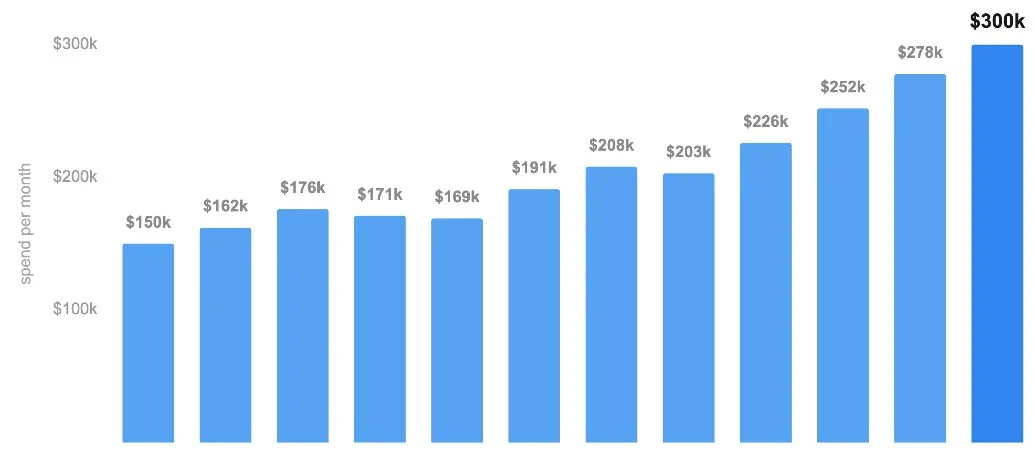
We are working through this exact problem on a multi-location B2B lead-generation account scaling toward $300,000 per month. The funnel tracks leads, booked calls, qualified proposals, and closed-won deals in HubSpot. The account has enough volume to move bidding deeper, but missing imports and a high-friction form can still send Google the wrong lesson.
This article explains the four changes we are making, why each one matters, and how to diagnose the setup without guessing.
Why Google Ads offline conversion tracking matters for B2B
Offline conversion tracking matters because the most valuable B2B outcomes usually happen after the website session ends. A buyer may submit a form today, book a call next week, reach proposal stage later, and close after several more conversations. Browser tracking sees the form. The CRM sees the business result.
If Google only receives the form submission, it learns to find more people who submit forms. It cannot distinguish a serious buyer from a student, vendor, job seeker, duplicate, or poor-fit company. Sending qualified stages back closes that information gap.
Google defines a GCLID, or Google Click ID, as the unique identifier attached to an eligible ad click. Teams can store the GCLID with a lead, then return it with a later offline event. Google now recommends enhanced conversions for leads for many new setups because hashed first-party data can supplement click identifiers and improve matching durability.
| Funnel event | What Google learns | Main limitation |
|---|---|---|
| Lead | Someone completed the first action | High volume, weak proof of fit |
| Booked call | Someone chose a sales conversation | No-shows and poor-fit calls still count |
| Qualified proposal | Sales confirmed fit and buying intent | Lower volume and longer reporting lag |
| Closed won | The lead produced revenue | Often too sparse for the only bidding signal |
The goal is not to push every account straight to closed-won optimization. It is to use the deepest reliable event that has enough consistent volume. Our broader guide to improving Google Ads lead quality explains how signal depth should shape targeting decisions.
Step 1: Keep AI Max off until tracking is dependable
AI Max should not become the first change in an account with unresolved conversion gaps. Broader query expansion gives Google more freedom, which makes the quality of the conversion signal more important. If the feedback loop is incomplete, expanding reach can scale the wrong leads faster.
In this account, AI Max stays off while we verify two settings that can affect migration timing: campaign-level broad match and dynamic search ads. We also review search terms weekly and prepare negative coverage before any expansion test.
This is a sequencing decision, not a claim that AI Max can never work for B2B. First prove that the account receives the right downstream outcomes. Then test broader automation in one controlled segment. Changing query expansion, conversion goals, landing pages, and bidding at once would make the result impossible to diagnose.
The same rule applies beyond AI Max. Our Google Ads campaign settings guide covers other defaults that can quietly change where budget goes.
Step 2: Troubleshoot missing HubSpot conversion imports
When some HubSpot deals reach Google Ads and others do not, the connector is not automatically the source of the problem. The failure can sit in the captured click ID, CRM field mapping, lifecycle-stage filter, conversion timestamp, consent data, conversion-action name, or upload format.
The fastest diagnostic is a controlled manual import:
- Create or choose a test conversion action that will not affect bidding.
- Export a small set of known deals, including examples that failed through the connector.
- Upload the records through a supported Google Ads import path.
- Review row-level errors and accepted records.
- Fix the field or filter causing the mismatch.
- Run the same records through the normal connector and reconcile the result.
Google’s offline conversion import guidance says common required fields include the match identifier, conversion action, and accurate conversion time. Duplicate uploads can also be rejected when the identifier, action, date, and time match an event already received.
The manual upload is useful because it turns a silent gap into a specific error. A rejected row might show that the timestamp uses the wrong time zone, the GCLID never reached HubSpot, or the lifecycle filter excluded the deal. That is more actionable than reconnecting the integration and hoping the missing records appear.
Google says imported statistics generally take about three hours to appear. Give the test enough time, then compare the accepted records with the “All conv. (by conv. time)” view so the reporting date follows the actual conversion time.
Step 3: Add qualified proposals as a deeper conversion goal
Qualified proposals are a useful second signal when they represent a consistent sales decision and occur often enough to teach the bidding system. This account produces about 60 qualified proposals per month, which gives us a practical base for testing the event without relying on a handful of rare closed deals.
The account currently bids on booked calls. Booked calls have more intent than form fills, but they still include people who never qualify. Adding the proposal stage helps Google distinguish between a meeting and a real commercial opportunity.
The rollout should be controlled:
- Define exactly what makes a proposal qualified.
- Confirm every sales rep applies the stage the same way.
- Import the event into a unique Google Ads conversion action.
- Keep the new action secondary while validating volume, lag, and match quality.
- Compare imported proposals with the HubSpot source count.
- Move the action into bidding only after the data is stable.
Google’s current enhanced conversions for leads checklist recommends validating a new imported action as secondary before using it for Smart Bidding. Primary actions can influence bidding. Secondary actions are generally observation-only.
Expect reporting to look worse before it looks better. A proposal happens later than a booked call, so recent clicks have had less time to mature. Cost per conversion may rise temporarily even when pipeline quality improves. Judge the test on cost per qualified proposal, qualified pipeline, and closed revenue, not the platform CPA alone.
For accounts that need several funnel stages, see our guide to using multiple conversion actions in Google Ads.
Step 4: Replace the long form with a staged quiz
A long form can block qualified buyers before the tracking system gets any signal at all. Multi-location landing pages often ask for contact details, company information, service needs, timing, location, and budget in one screen. Each field may help sales, but the combined demand creates friction.
A staged quiz asks one easy question first, then reveals the next step. The buyer sees progress and learns more about the offer while providing qualification details. This can increase completion without removing the questions sales needs.
The form change still needs measurement discipline. Track the start, each meaningful step, the completed lead, the booked call, and the qualified proposal. Do not make quiz starts a primary conversion simply because they produce more volume. The event that steers bidding should still represent meaningful business progress.
A practical test should keep the traffic source, offer, and conversion-goal settings stable. Compare completion rate, booked-call rate, proposal rate, and revenue per visitor. If completion rises while proposal quality falls, the quiz removed useful friction instead of wasteful friction.
Common failure modes in offline conversion tracking
Most broken setups fail in the handoffs between systems, not in the final Google Ads screen.
| Failure mode | What happens | Check first |
|---|---|---|
| Missing GCLID | CRM outcome cannot match the original click | Hidden form field, redirects, cookie retention |
| Wrong conversion time | Event falls outside the expected reporting period | Time zone and timestamp format |
| Inconsistent CRM stages | Sales outcomes do not mean the same thing | Stage definitions and rep training |
| New goal made primary too early | Smart Bidding reacts to incomplete data | Secondary validation period |
| Connector filter excludes records | Some valid deals never export | Lifecycle and pipeline filters |
| Duplicate event key | Upload is rejected or ignored | Identifier, action name, date, and time |
| Long reporting lag | Recent campaigns look worse than they are | Funnel lag by stage |
Do not use imported events for bidding until the CRM count and Google Ads count reconcile closely enough to explain every material gap. Perfect equality is not always possible because attribution rules differ, but unexplained missing deals are a tracking problem, not normal variance.
How to run the audit yourself
Start with ten known records. Pick a mix of accepted deals, missing deals, recent proposals, and older closed-won outcomes. Trace each one from the original landing-page submission through HubSpot and into Google Ads.
For every record, confirm:
- The click identifier or user-provided match data was captured.
- The identifier remained attached to the correct contact and deal.
- The lifecycle or deal stage met the connector filter.
- The conversion action name matches the Google Ads setup.
- The timestamp reflects when the offline event happened.
- Consent and data-use requirements are met.
- The event appears once, in the expected reporting view.
If the pipeline cannot pass this ten-record test, do not solve the problem with more automation. Fix the first broken handoff, rerun the same records, and only then expand the import.
The takeaway
Google Ads offline conversion tracking is a revenue feedback loop, not a box to check. Capture the ad interaction, preserve it in HubSpot, define sales stages consistently, import the deeper outcomes, and validate every handoff before using those events for bidding.
For this B2B account, the order is clear: hold broader automation, repair missing imports, validate qualified proposals as a second signal, then test a lower-friction quiz funnel. Each change improves the information Google receives without hiding which change caused the result.
TNT Growth connects Google Ads to CRM and revenue data for brands spending $75K+/mo. Review our Google Ads and conversion tracking services or book a 30-minute ad audit to find the first break in your current feedback loop.
Frequently asked questions
What is Google Ads offline conversion tracking?
Google Ads offline conversion tracking sends CRM outcomes such as qualified leads, proposals, and closed deals back to Google Ads. The imported event is matched to the original ad interaction through a GCLID or hashed first-party data, which lets reporting and Smart Bidding learn from sales outcomes instead of form fills alone.
Can HubSpot send offline conversions to Google Ads?
Yes. HubSpot can pass selected lifecycle events to Google Ads when the integration, field mapping, consent, click identifiers, and conversion actions are configured correctly. Teams should still reconcile imported events against HubSpot records and use a controlled file upload when they need row-level error details during troubleshooting.
Should qualified proposals be a primary Google Ads conversion?
Qualified proposals can become a primary conversion when the stage is defined consistently, imports are accurate, and monthly volume is high enough for stable bidding. Google recommends validating a new imported action as secondary before using it for optimization. The account in this example produces about 60 qualified proposals per month.
How do you troubleshoot missing offline conversions?
Export a small set of known CRM outcomes and upload them through Google Ads Data Manager or a supported import path. Review each rejected row for missing click IDs, incorrect timestamps, conversion-action names, consent fields, or formatting. Fix the underlying mapping, then reconcile the connector against the accepted test records.
How long do imported conversions take to appear in Google Ads?
Google says imported conversion statistics generally take about three hours to appear. Timing varies by import method and setup, so validate with a known test set and use conversion-time reporting when checking whether the events landed on the expected dates.