
B2B website visitor identification turns an anonymous high-intent visit into an account-level action plan. Match the likely company, combine the visit with CRM and campaign context, score the behavior, alert the right owner, personalize the next experience, and create focused ABM follow-up. The goal is relevance and timing, not surveillance or noisy alerts.
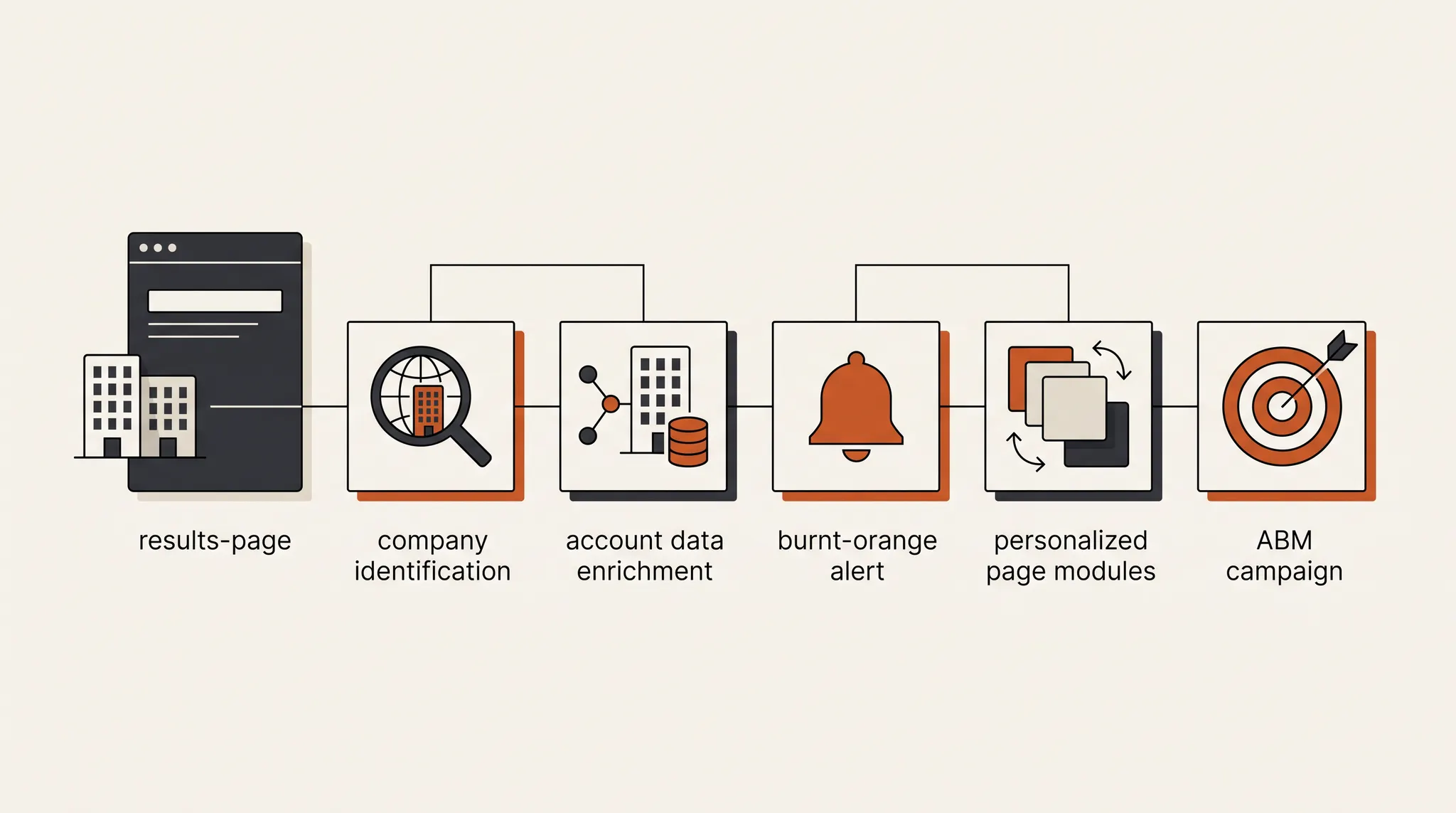
In the source example, two companies had visited TNT Growth’s results page multiple times. That behavior mattered because a results page sits close to a buying decision. The workflow compiled the available account context, prepared a more relevant return experience, flagged the account when it came back, recommended a matching ABM campaign, and aligned the offer with the ad or keyword that brought the visitor in.
That is a stronger use of visitor data than sending sales a message every time an unknown company loads the homepage.
What is B2B website visitor identification?
B2B website visitor identification is the process of connecting a visit to a likely company or known account, then interpreting that activity alongside first-party data. The output is usually an organization-level signal such as company, industry, account status, source, pages viewed, and recency. It is not reliable proof that a specific employee visited.
A useful account record can combine:
- Probable company or known account
- Industry, size, geography, and account tier
- Pages viewed and repeat-visit pattern
- Traffic source, campaign, and content variation
- Existing CRM contacts, opportunities, and owner
- Prior form submissions or known sessions where permitted
- Last activity, engagement depth, and intent score
Google Analytics documents how campaign and traffic-source values are collected from tracking code, referral data, UTM parameters, and click IDs. That source context is essential because the right follow-up for a visitor from a competitor campaign may differ from the follow-up for a returning direct visitor. See Google’s guide to campaigns and traffic sources.
Why high-intent pages should drive the workflow
A visitor identification program should begin with a small set of pages that signal evaluation. Results, pricing, service, integration, comparison, and booking pages usually deserve more weight than a single blog view or homepage load.
The source example began with repeat visits to /results. That is useful because the page contains proof and suggests the company may be checking fit, credibility, or expected outcomes. One visit can be research. Multiple engaged visits from the same account create a stronger signal, especially when the account matches the ideal customer profile.
Use a simple intent table before building automations:
| Behavior | Suggested signal | Recommended action |
|---|---|---|
| One homepage view | Low | Record only |
| One relevant blog view | Low to medium | Add topic context, no alert |
| Repeat service-page visits | Medium | Update account score |
| Results or case-study return | High | Review account and proof fit |
| Pricing, comparison, or booking visit | High | Alert owner if account qualifies |
| Multiple high-intent pages in one session | Very high | Personalize return path and prepare outreach |
The 5-step B2B website visitor identification playbook
The workflow works when each step produces a clear input for the next one. Identification alone is not the outcome. It is the start of account-level coordination.
1. Match the company, then state the confidence
Start with the company or account match your platform returns. Record whether the match is known, probable, or unknown. Known can mean the visit connects to an approved first-party identifier or existing account record. Probable means the organization is inferred and should be treated as a signal, not a fact about a person.
The failure mode is hiding uncertainty. Sales sees a company name and assumes a specific contact is active. Add the match source and confidence to the account record so everyone knows how much weight to place on it.
2. Compile account and visit context
A company name without context does not tell the team what to do. Combine firmographic fit, CRM status, page behavior, source, recency, and prior engagement into one account view.
In the source example, the workflow compiled every available data point on the two companies. A practical record should answer:
- Is this company in the target segment?
- Does the CRM already contain contacts or an opportunity?
- Which page or proof asset brought it back?
- Which campaign, keyword, or referral led to the session?
- Has it visited before, and how recently?
- Who owns the account?
- What would make the next interaction more useful?
Use consistent UTM parameters so paid and referral visits retain their source. Google recommends setting all relevant campaign parameters because missing values create incomplete reporting. Its campaign URL guidance covers source, medium, campaign, ID, and source platform.
3. Alert the right person only when the threshold is met
Alerts should represent a decision, not an event stream. Define the conditions that deserve attention and route them to the person who can act.
A strong alert might require:
- The account fits an approved segment.
- The visit reached a high-intent page.
- The activity is new or materially stronger than the last alert.
- An owner or relevant team exists.
- The message includes context and a recommended next step.
Add a cooldown period. If a company refreshes the results page six times, sales does not need six notifications. One alert with the visit pattern, source, related proof, account owner, and suggested action is more useful.
The source workflow flags the team when the account returns. That timing is valuable because the account is active now, not because it once visited three months ago.
4. Personalize the next visit around verified relevance
Account-based website personalization should make a page more useful for the visitor’s likely context. It should not announce that the company has been identified.
Salesforce defines account-based marketing as treating a high-value account as a market of one and using account data to create personalized experiences across channels, including the web. Its account-based marketing guide emphasizes accurate account data and coordination with sales.
Good page changes include:
- Industry-specific headline or subhead
- Relevant case studies and proof
- Use cases that match the account’s business model
- Appropriate integration or tracking details
- CTA aligned to account stage
- Offer language aligned to campaign or keyword intent
Keep a strong default experience and change only elements supported by reliable context. Do not invent customer pain, display a company logo without a clear reason, or make the page feel like it is watching the visitor.
The source example tailors the offer to the keyword and ad the visitor clicked. That is a practical bridge between acquisition intent and landing-page relevance, similar to the dedicated page discipline in our competitor Google Ads playbook.
5. Create focused ABM follow-up
Once the account is qualified and the visit shows real intent, build a small follow-up plan around the same context. Account-based marketing, or ABM, focuses marketing and sales on selected high-value companies rather than treating every lead the same.
The follow-up can include:
- A focused LinkedIn account campaign
- Retargeting with the proof the account viewed
- A tailored landing page or return experience
- Sales outreach referencing the business problem, not hidden tracking
- Email to known, opted-in contacts where permitted
- A relevant case study, audit, or working session
The message across the ad, page, and sales follow-up should agree. If the visitor entered through a healthcare campaign, the page should not show generic SaaS proof and the sales note should not ignore the industry context.
This account-level coordination fits inside a broader B2B demand generation strategy, where Search captures intent and social, ABM, and other channels support the buying committee over time.
What can go wrong with visitor identification?
The most common problems are false certainty, weak thresholds, creepy personalization, disconnected systems, and poor privacy controls.
Treating a company match as a named person
A company-level signal does not prove which employee visited. Keep claims at the account level unless the person identifies themselves through an approved form, login, email interaction, or other first-party process.
Alerting on every visit
Too many alerts train sales to ignore the system. Weight page intent, repeat behavior, account fit, recency, and existing opportunity status before sending anything.
Personalizing from stale or weak data
An outdated industry label or old opportunity stage can make the experience less relevant. Show the data source and refresh date. Fall back to the standard page when confidence is low.
Sending personal data through analytics URLs
Google Analytics prohibits sending personally identifiable information such as email addresses through URLs, titles, custom dimensions, campaign parameters, and events. Google’s PII guidance recommends removing personal data from URL paths and parameters and using available redaction controls.
Skipping consent, retention, and access rules
Privacy requirements vary by jurisdiction, data source, and use. Document what is collected, why it is needed, how long it is retained, who can access it, and how consent choices are honored. Limit the data to what the workflow needs and have qualified counsel review uncertain implementations.
How to run the workflow yourself
Start with one high-intent page and a short account list. Prove that the alerts and personalization create better decisions before expanding.
- Choose results, pricing, comparison, or service pages.
- Define the target segments and account owner rules.
- Connect company-level visits to one account record.
- Preserve source, campaign, page, recency, and visit depth.
- Label match confidence and avoid person-level assumptions.
- Build a fit plus intent scoring model.
- Set one alert threshold and a cooldown period.
- Include context and a recommended action in the alert.
- Create one industry or account-tier page variation.
- Launch one matching ABM follow-up for qualified accounts.
- Track engaged sessions, meetings, opportunities, and revenue.
- Review false matches, ignored alerts, and stale data monthly.
The takeaway
B2B website visitor identification is useful when it connects fit, intent, timing, and action. Start with high-intent pages. Keep the match at the account level. Compile the context in one record. Alert only when a threshold is met. Personalize around verified relevance. Then coordinate ABM and sales follow-up around the same business problem.
The system should help a good team act with better timing. It should not create false certainty or make the visitor feel watched.
TNT Growth builds paid-media, conversion tracking, landing pages, and account-focused growth systems for brands spending $75K+/mo. Review our growth and tracking services, see results tied to revenue, or book a 30-minute ad audit to map the highest-intent path on your site.
Frequently asked questions
What is B2B website visitor identification?
B2B website visitor identification is the process of matching a site visit to a likely company or known account, then combining that visit with first-party engagement and CRM context. It usually identifies an organization or account, not the exact employee who viewed the page.
Can you identify anonymous companies visiting your website?
Some platforms can return a probable company-level match from network, firmographic, campaign, or account data. Coverage and accuracy vary, and a company match does not prove which person visited. Treat it as a prioritization signal that needs corroborating engagement and CRM context.
Which website visits should trigger an alert?
Alert on meaningful intent, not every pageview. Useful triggers include repeat visits to results, pricing, service, integration, or comparison pages; multiple engaged sessions; a return from a target account; or a visit connected to an active opportunity. Add frequency limits so sales does not receive noise.
How should a B2B website be personalized by account?
Personalize only what improves relevance: industry language, applicable proof, use cases, integration details, offer framing, and the primary CTA. Keep factual claims accurate, preserve a sensible default experience, and avoid exposing that the visitor has been identified in a way that feels intrusive.
Is B2B website visitor identification privacy compliant?
Compliance depends on the data source, jurisdiction, consent, vendor terms, retention, and how the data is used. Keep personally identifiable information out of analytics URLs and campaign parameters, document the purpose, honor consent choices, limit access, and have counsel review the implementation when needed.